Graphic gap match interaction
3.2.14 Graphic Gap Match Interaction — a graphical interaction with a set of gaps defined as hotspot areas of an image, and a set of gap choices defined outside the image. The candidate associates each gap choice with a gap in the image.
Also see the attributes shared by every interaction on the overview page, and min-associations/max-associations/disable-animations/auto-size-dropzones from the same drag/drop mixin used by Gap match.
Example
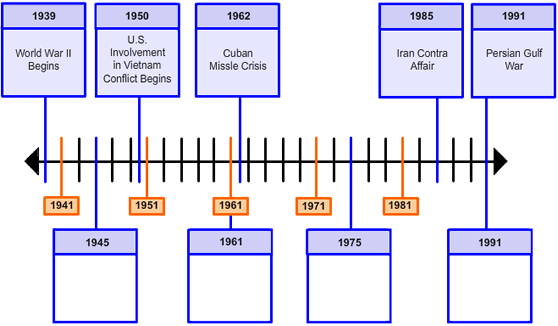


<qti-graphic-gap-match-interaction response-identifier="RESPONSE"> <qti-prompt>Some labels on this Cold War timeline are missing. Drag each event tile to the correct highlighted hotspot.</qti-prompt> <img alt="timeline from 1939 to 1991" src="/assets/qti-graphic-gap-match-interaction/timeline-558.png" height="326" width="558" /> <qti-gap-img identifier="DraggerA" match-max="2"> <img src="/assets/qti-graphic-gap-match-interaction/a-cw.png" alt="Choice A, The Cold War Ends" height="63" width="78" /> </qti-gap-img> <!-- ...more qti-gap-img choices... --> <qti-associable-hotspot coords="55,256,133,319" identifier="A" match-max="2" shape="rect"></qti-associable-hotspot> <!-- ...more hotspots... --></qti-graphic-gap-match-interaction>qti-gap-img (draggable choice)
| Attribute | Notes |
|---|---|
identifier | |
match-max | How many hotspots this image can be dropped onto. |
Auto-assigns itself slot="drags" on connect; wraps an <img> as its content.
qti-associable-hotspot (drop target)
Same element as Graphic associate — identifier, shape, coords, match-max.